
Have you ever had a brilliant idea for a handy little tool or a website feature, but then immediately hit a wall because you don’t know how to code? We’ve all been there. You want to create simple apps using Gemini 3, but instead, you stare at the screen, maybe Google “how to learn JavaScript,” get overwhelmed by a thousand different tutorials, and eventually, the idea just fades away.
But here is the thing: the game has changed completely as of November 2025.
With the release of Google’s Gemini 3, the barrier to entry for software development hasn’t just been lowered; it has been practically smashed to pieces. We are entering the era of “vibe coding,” where your natural language—the way you speak and think—is the only programming language you actually need to know.
Today, I’m going to show you exactly how to create simple apps using Gemini 3 without writing a single line of code yourself. To prove it, we are going to walk through a real-world example: building a fully functional, private, client-side PDF Merger tool. And the best part? We built this tool in minutes.

The Gemini 3 Revolution: Why Now?
If you have used AI for coding before, you might be skeptical. In the past, asking an AI to “build an app” often resulted in broken code, weird errors, or a half-baked script that required a computer science degree to actually run.
Gemini 3 is different. Released just this month, it boasts a massive leap in reasoning capabilities. It doesn’t just predict the next word; it “thinks” about the architecture of what you are asking for. It understands user intent significantly better than its predecessors. When you ask it to create simple apps using Gemini 3, it anticipates the files you need, the libraries that make sense, and the user interface requirements that modern users expect.
For our project, we wanted something useful. Not just a “Hello World” text, but a utility that people actually search for. A PDF Merger is a classic tool. Usually, you have to upload your sensitive documents to a random server to merge them, which is a huge privacy risk. We wanted to build a version that runs entirely in the browser—safe, secure, and fast.
The “Zero Coding” Workflow
Let’s get down to business. How do you actually do this? You don’t need to install complex development environments like Visual Studio Code or set up a Node.js server if you don’t want to. For simple tools, you can often do everything with a single HTML file.
Here is the step-by-step process we used to build the tool found at our Free PDF Merger Online Tool.
Step 1: Define Your Vision
Before you even open Gemini, you need to know what you want. “Make a PDF app” is too vague. You need to visualize the features. We decided our app needed:
- Privacy: No uploading to a server (Client-side only).
- Ease of use: Drag and drop support.
- Functionality: Reordering files and merging them.
- Aesthetics: A modern, clean UI.
Step 2: The Magic Prompt
This is the most critical part. To create simple apps using Gemini 3 effectively, you must be specific. Think of yourself not as a coder, but as a project manager giving instructions to a very capable developer.
To ensure we got the phrasing exactly right, we actually used ChatGPT to help us draft the initial prompt. We told ChatGPT what we wanted, and it gave us a structured, technical description that Gemini 3 could perfectly understand.
Here is that exact prompt. You can copy this structure for your own ideas:
“Create a fully working PDF Merge Tool using only HTML, CSS, and JavaScript (client-side only, no backend). The tool must let users upload multiple PDF files (each pdf maximum size 100mb, upto 10 pdf file), reorder them if needed, merge them using a library like pdf-lib, and download button for the final merged PDF. It should show uploaded file names, include a modern clean UI, have a merge button, progress bar, support drag-and-drop upload, clear button just below the download button. Downloadable output file name must be in this format ‘merged_(original file name).pdf’, and there must be preview of the downloadable pdf file with output file name. Make everything responsive in the mobile screen.”
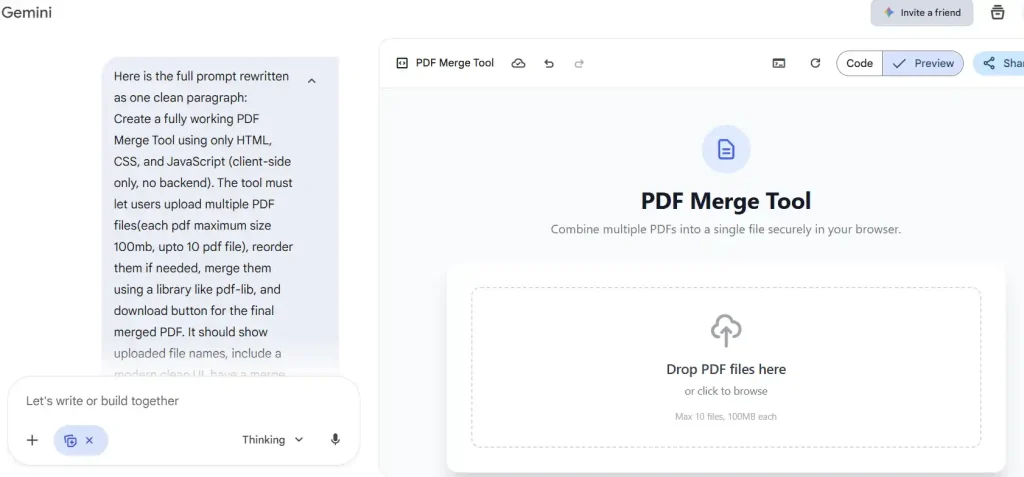
Notice the details? We specified the library (pdf-lib), the constraints (100MB limit), the UI elements (progress bar, clear button), and even the exact filename format for the download.
Step 3: Generating and Implementing
Once you feed this prompt into Gemini 3, it gets to work. Within seconds, it generates a complete block of code.
Because we asked for “HTML, CSS, and JavaScript,” Gemini 3 is smart enough to often bundle these into a single file for convenience, or separate them clearly. For a beginner, asking for a “Single HTML file solution” is a great trick. It means you just get one block of text to copy.
How to test the code Gemini gives you:
For our testing, we used Visual Studio Code (VS Code). It’s a fantastic free code editor that makes managing your files and previewing your work much easier. However, if you want to keep it simple, you can use any basic text editor.
- Open VS Code (or Notepad/TextEdit).
- Create a new file and name it
index.html. - Paste the code Gemini generated into this file.
- Save it.
- Double-click
index.html(or right-click “Open with Live Server” if using VS Code).
That’s it. Your browser (Chrome, Firefox, Safari) will open the file and render the app immediately. You have just built software.
Why This Example Worked So Well
When you look at the result, you will see a sleek, modern interface. But why did Gemini 3 choose the specific technologies it did? Understanding this helps you create simple apps using Gemini 3 in the future.
The Power of pdf-lib Gemini selected the pdf-lib library because we specifically asked for a client-side solution. Most PDF processing happens on a backend server (using Python or Java), which is heavy and requires hosting. pdf-lib is a JavaScript library that can manipulate PDFs right inside your browser memory. This was a crucial architectural decision that Gemini made correctly based on our prompt.
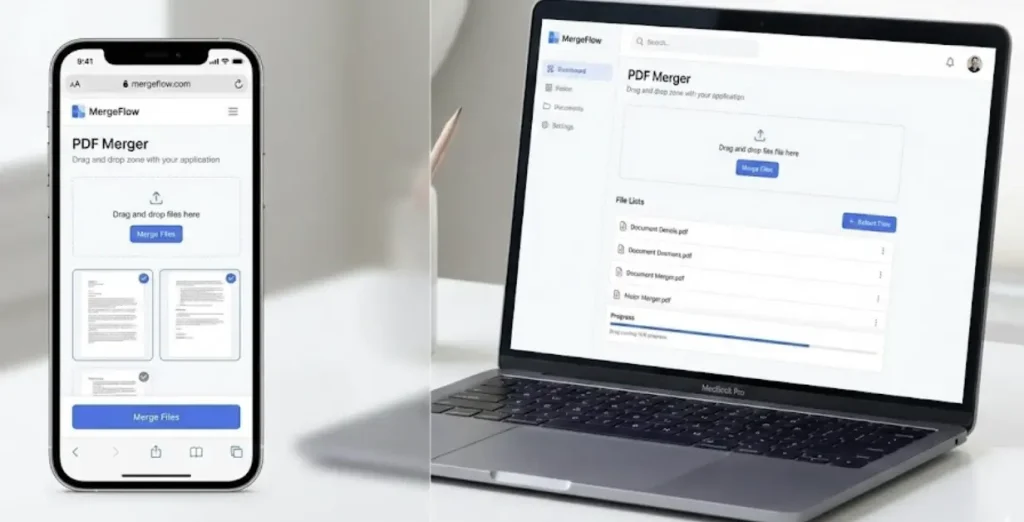
Responsive Design We asked for the app to be “responsive in the mobile screen.” Gemini 3 utilized CSS Flexbox and Grid layouts, ensuring that the buttons and drop zones resize perfectly whether you are on an iPhone or a wide desktop monitor. In the past, AI struggled with CSS, often overlapping elements. Gemini 3 has a much better grasp of spatial reasoning in UI design.
Refining Your App: The “Chat” Phase
Rarely is code 100% perfect on the very first try, although Gemini 3 is getting frighteningly close. The beauty of this process is that if you see something you don’t like, you don’t dig into the code to fix it. You just complain to Gemini.
For example, if the “Merge” button is too small, you simply type: “Make the merge button larger and change the color to a bright blue.”
Gemini interprets this visual request and updates the CSS code accordingly. This iterative process allows you to polish your application until it looks professional. It feels less like debugging and more like art direction.
Beyond PDFs: What Else Can You Build?
The PDF Merger is just the tip of the iceberg. Now that you know how to create simple apps using Gemini 3, the possibilities are endless. Here are a few ideas you could try right now with similar prompts:
- A Personal Budget Tracker: Ask for a tool that saves your expenses to your browser’s “Local Storage” so data persists even after you refresh.
- A Pomodoro Timer: Ask for a productivity timer with custom alarm sounds and a to-do list integrated.
- A Markdown Editor: A simple writing tool that converts your text to HTML in real-time.
- Image Converter: A tool to convert PNGs to JPGs using the browser’s canvas API.
The key is keeping the scope “simple” and “client-side” if you want to avoid paying for server hosting.
The Future of Creation
We are witnessing a democratization of technology that is honestly hard to overstate. You no longer need to spend six months learning syntax to build a solution for a problem you have. You just need clarity of thought.
If you want to see the final result of our experiment, check out the tool we built. It is live right now: Free PDF Merger Online Tool. It is fast, free, and completely secure because the code runs on your device, not ours.
For more updates on how AI is reshaping the tech landscape, keep following our IT and Tech News category. We are constantly testing the limits of these new models so you don’t have to.

Conclusion
Learning how to create simple apps using Gemini 3 is a skill that will pay dividends. It turns you from a passive consumer of technology into an active creator. The next time you think, “I wish there was an app for that,” don’t search the App Store. Open Gemini, describe your dream, and build it yourself.
The era of the “Idea Guy” is over. Now, everyone can be a Builder.
For more technical details on the libraries used in this tutorial, you can check out the official Google Gemini 3 Release Blog to understand the engine powering these capabilities.
Happy building!

