
We have all been there. You have a resume in one file, a cover letter in another, and a portfolio in a third. Sending three separate attachments looks cluttered and unprofessional. Or maybe you are a student trying to submit an assignment, but your scanner saved every page as a separate document. You need a way to bring it all together, and you need it fast. You need a Free PDF Merger Online that works instantly, respects your privacy, and doesn’t cost a cent.
That is exactly what we built at Trick47. In this guide, I will walk you through exactly how to use our tool to declutter your digital life. But first, let’s look at why this tool is safer than the alternatives.
Why Use the Trick47 PDF Merger?
Most online PDF tools work by uploading your private files to a remote server. The server processes them and sends them back. For sensitive documents—like bank statements, contracts, or personal IDs—this is a security risk. You are trusting a stranger with your data.
Our Free PDF Merger Online is different. It uses advanced browser-based technology (WebAssembly). This means the merging process happens 100% inside your web browser.
Your files never leave your device. It is safer, faster, and more reliable.
Step-by-Step Tutorial: How to Merge PDF Files
Ready to combine your documents? Follow these simple steps to get a clean, professional result in seconds.
Step 1: Open the Tool
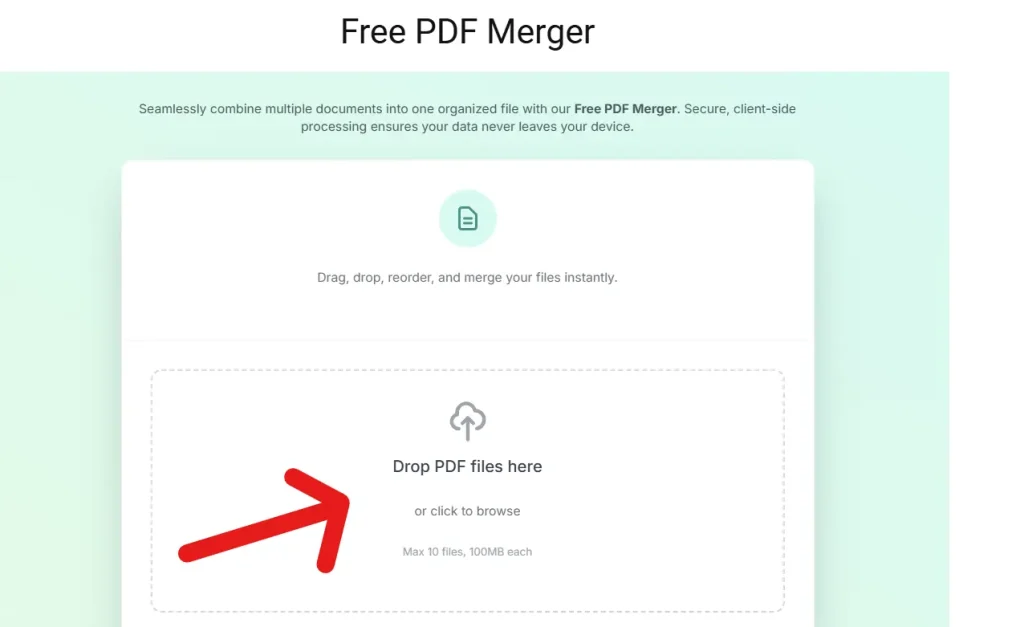
Head over to the Trick47 Free PDF Merger Online tool. You will see a simple, clean interface designed for speed. No account creation is required.
Step 2: Select Your Files
You can add files in two ways:
- Drag and Drop: Simply drag your PDF files from your computer folder directly into the “Drop PDF files here” box.
- Browse: Click anywhere inside the box to open your file explorer and select your documents.
Pro Tip: You can select up to 10 files at once, with a generous limit of 100MB per file. Because the processing is local to your device, we don’t restrict you with tiny file size limits like other sites do.
Step 3: Reorder Your Documents
Once your files are added, they will appear in a list. This is the most crucial step. The order they appear here is the order they will appear in your final document.
- Check the file names to ensure everything is correct.
- Use the Up (↑) and Down (↓) arrows next to each file to rearrange them.
- Need to remove a file? Click the Trash Can icon.
Make sure your cover page is at the top and your supporting documents follow in a logical sequence.
Step 4: Merge Instantly
Click the “Merge PDFs” button.
Since this is a client-side Free PDF Merger Online, you won’t have to wait for a progress bar to upload data to the internet. The process is nearly instantaneous. Your browser does the math right there on your device.
Once complete, the tool will generate a preview of the first page. This is your final check to ensure the correct document is leading the pack.
Step 5: Download Your File
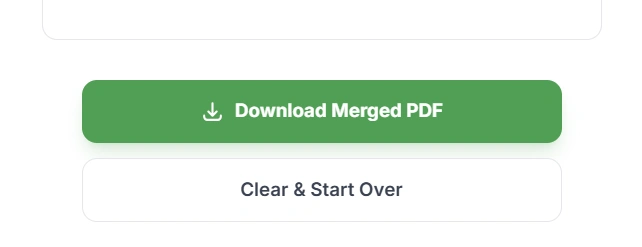
Click the “Download Merged PDF” button to save the new file to your computer or phone. That’s it! No watermarks, no hidden fees, and no email sign-ups.
Best Practices for Perfect PDFs
To get the most out of the tool, keep these tips in mind:
- Unlock First: If your PDF is password-protected, the merger cannot open it. Remove any passwords from your source files before uploading.
- Name Files clearly: Renaming your files (e.g., “01_Intro”, “02_Data”) before uploading makes the reordering step much faster.
- Watch the Size: The tool is lossless, meaning it keeps the original quality of your text and images. If you merge huge files, the result will be a huge file.
Why This Tool is Essential for You
For Job Seekers: Recruiters hate downloading multiple files. Combine your resume, cover letter, and references into one sleek PDF packet. It looks professional and ensures your application stays together.
For Students: Submitting assignments often involves combining scanned handwritten notes with typed reports. Our tool stitches these different formats into a single submission-ready file, saving you from the “I sent the wrong attachment” panic.
For Freelancers: Combine your invoice, timesheet, and project summary into a single document for your clients. It makes their life easier, which usually means you get paid faster.
Conclusion
Managing digital documents shouldn’t be a headache, and it certainly shouldn’t compromise your privacy. By using a Free PDF Merger Online that processes data locally, you get the best of both worlds: the convenience of a web tool with the security of desktop software.
Whether you are on Windows, Mac, Linux, or mobile, this tool is ready whenever you are. Give it a try next time you need to bring order to your digital files.
For more tips on how to optimize your digital workflow and stay safe online, check out our latest articles in IT and Tech News. We are constantly covering the tools and trends that make technology work for you.

